Church Technology
AI Bible Verse Image Generator: How to Create Scripture Art in Minutes
Free 7-Day Journey
Go Deeper Into Scripture
7 cinematic devotionals delivered to your inbox — one story, one verse, one life-changing truth per day.
No spam. Unsubscribe anytime.
Published: March 2026 | Category: Church Technology, Media
Scripture art has been a part of Christian worship and home decoration for centuries — from illuminated manuscripts to cross-stitch samplers to the framed verse prints that hang in millions of Christian homes today. What has changed dramatically in the past two years is how that art gets made. AI image generators have made it possible for anyone — regardless of design skill — to create stunning, original Scripture artwork in minutes.
This guide explains how AI Bible verse image generators work, reviews the best tools available in 2026, and provides practical tips for creating Scripture art that is both beautiful and theologically faithful.
Why Scripture Art Matters
Visual reminders of God's Word have always served a devotional purpose. Deuteronomy 6:9 instructs God's people to "write them on the doorframes of your houses and on your gates" — a command that has inspired everything from mezuzot to modern Scripture prints. Research on visual learning confirms what Scripture already teaches: what we see repeatedly shapes what we think and believe.
In a digital age where the average person checks their phone over 90 times per day, a Scripture wallpaper or social media graphic becomes a powerful tool for keeping God's Word at the center of daily life. AI image generators make it easier than ever to create these visual anchors — personalized, beautiful, and free from copyright concerns.
How AI Bible Verse Image Generators Work
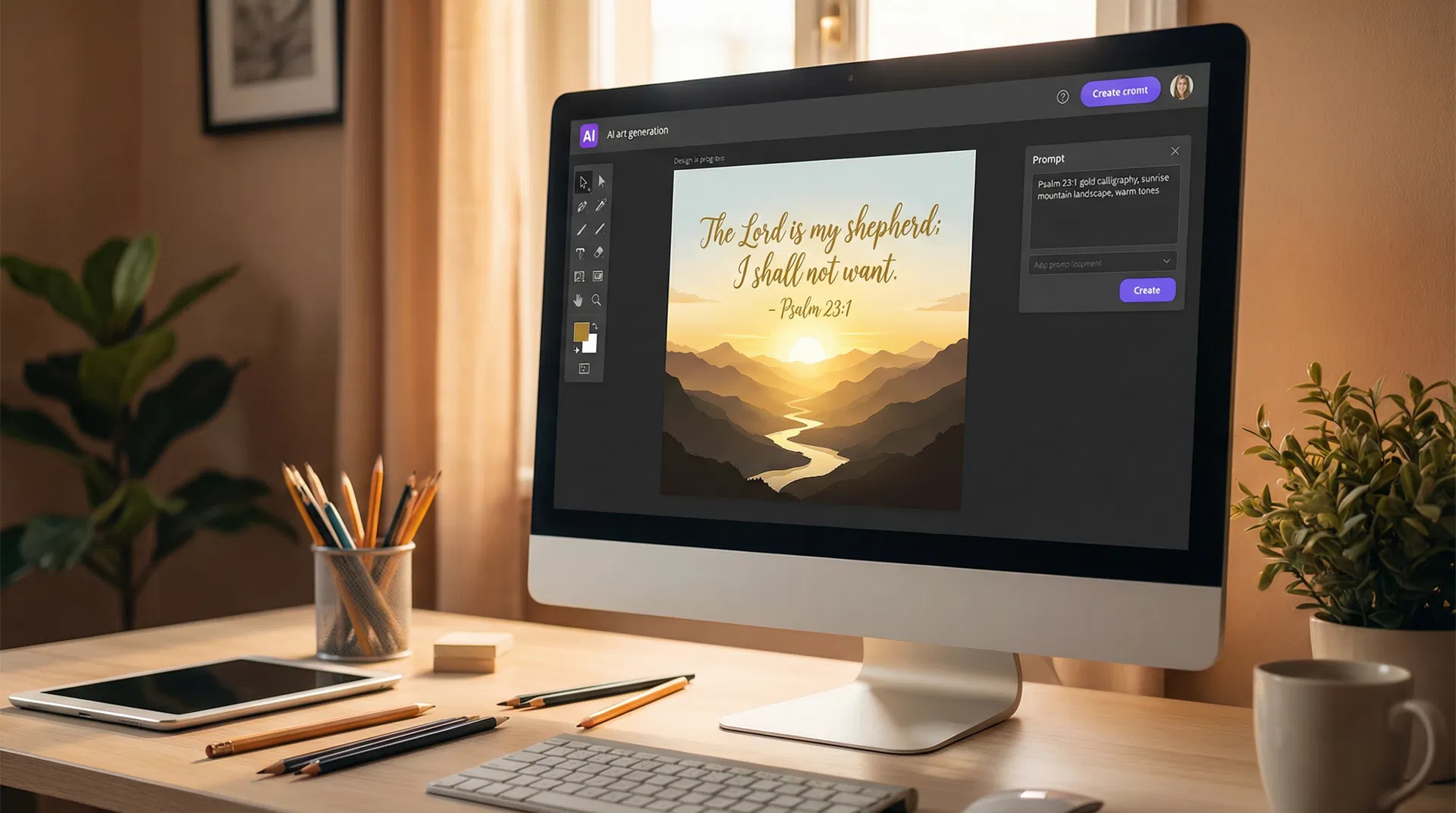
AI image generators use large neural networks trained on millions of images to create new visuals from text descriptions (called "prompts"). When you type "a peaceful mountain sunrise with Psalm 23:1 overlaid in elegant gold typography," the AI interprets your description and generates an original image that matches it.
The best results come from combining two types of AI: an image generator (like Midjourney, DALL-E 3, or Adobe Firefly) for the visual background, and a text overlay tool (like Canva or Adobe Express) for adding the Scripture verse in a readable, beautiful font.
Some platforms now combine both steps into a single workflow, making the process even more accessible for non-designers.
The Best AI Tools for Creating Scripture Art
1. Canva AI + Magic Media — Best for Beginners
Canva's AI features make it the most accessible option for creating Scripture art without any design experience. The "Magic Media" feature generates background images from text prompts, and Canva's extensive template library provides pre-designed Scripture graphic layouts that you can customize with your chosen verse.
How to use it:
- Open Canva and select "Social Media Post" or "Phone Wallpaper" as your format
- Use Magic Media to generate a background image (e.g., "soft watercolor sunrise, warm golden tones, peaceful")
- Add a text box with your Scripture verse
- Choose a font that complements the image (Canva's font pairing suggestions are helpful)
- Download in high resolution
Best for: Social media graphics, church bulletins, simple wallpapers
Pricing: Free tier available; Canva Pro at $14.99/month
2. Adobe Firefly — Best for Professional Quality
Adobe Firefly is trained exclusively on licensed images, making it the safest choice for churches and ministries concerned about copyright. Its image quality is consistently high, and its integration with Adobe Express makes adding text overlays straightforward.
Firefly's "Generative Fill" feature is particularly useful for Scripture art: you can start with a photograph (a sunset, a forest, a church interior) and use AI to extend or modify it, then add your verse as a text overlay.
Best for: High-quality prints, church publications, professional ministry materials
Pricing: Included with Adobe Creative Cloud; standalone from $4.99/month
3. Midjourney — Best for Artistic and Painterly Styles
Midjourney produces the most visually stunning AI images available, with a distinctive painterly quality that works beautifully for Scripture art. Its images have an almost hand-crafted feel — more like a watercolor or oil painting than a digital render — which many believers find more fitting for devotional art than the cleaner look of other generators.
Midjourney requires using Discord, which adds a small learning curve, but the quality of results is unmatched for artistic Scripture art.
Sample prompt: peaceful garden scene, morning light filtering through ancient olive trees, warm golden tones, impressionist watercolor style, high detail --ar 9:16
Then add your Scripture verse using Canva or Adobe Express.
Best for: Devotional art, home prints, premium wallpapers
Pricing: From $10/month
4. DALL-E 3 (via ChatGPT) — Best for Specific Scene Descriptions
DALL-E 3 excels at following detailed, specific prompts — making it ideal when you have a clear vision for the scene you want to create. If you want an image that depicts a specific biblical narrative (the prodigal son returning, the disciples on the Sea of Galilee, the empty tomb at dawn), DALL-E 3 handles narrative scenes better than most competitors.
Sample prompt: "The prodigal son running toward his father on a dusty road at sunset, the father's arms open wide, warm golden light, realistic painterly style, cinematic composition"
Best for: Narrative Bible scenes, specific story illustrations
Pricing: Included with ChatGPT Plus ($20/month)
5. BibleWithLife Wallpapers — Best Ready-Made Scripture Art Collection
For those who want beautiful Scripture art without creating it themselves, BibleWithLife offers a curated library of over 180 Scripture wallpapers organized by theme. Each wallpaper pairs a carefully chosen verse with original artwork, available in mobile-optimized formats.
The collection covers themes including God's faithfulness, peace, strength, hope, love, and seasonal topics — making it easy to find a wallpaper that speaks to your current season of life or ministry need.
Best for: Ready-to-use Scripture wallpapers, daily devotional backgrounds, church digital displays
Pricing: Free
Platform: Web, Mobile at BibleWithLife.com
Step-by-Step: Creating a Scripture Wallpaper with AI
Here is a complete workflow for creating a high-quality Scripture phone wallpaper using free tools:
Step 1: Choose your verse. Select a verse that is meaningful to you or relevant to a current sermon series or season of the church calendar.
Step 2: Write an image prompt. Describe the visual mood you want. Consider: time of day (dawn, golden hour, night sky), setting (garden, mountain, ocean, forest, abstract), color palette (warm golds, cool blues, soft pastels), and style (realistic, watercolor, painterly, minimalist).
Example prompt: "Soft morning light breaking through ancient forest trees, rays of golden light, peaceful and holy atmosphere, watercolor style, vertical format 9:16"
Step 3: Generate the background image. Use Canva Magic Media, Adobe Firefly, or Midjourney to generate your background. Generate 3-4 variations and choose the one that best fits the verse's mood.
Step 4: Add the Scripture text. Import your background into Canva. Add a text box with the verse, choose a font that is both readable and beautiful (serif fonts like Playfair Display or Cormorant Garamond work well for Scripture art), and adjust the text color and size for readability.
Step 5: Add the reference. Always include the book, chapter, and verse reference below the text. This is both practically useful and helps viewers find the verse in their own Bible.
Step 6: Export in high resolution. Download as PNG at the highest available resolution for the sharpest result on modern phone screens.
Tips for Theologically Faithful Scripture Art
Use the full verse. Partial verses can distort meaning. If the verse is too long to fit elegantly, choose a shorter verse or use a key phrase with the full reference so viewers can read the context.
Check your translation. Different translations render verses differently. Choose a translation that is both accurate and readable. The ESV, NIV, and NLT are all widely used for Scripture art.
Match the mood to the message. A verse about God's comfort in suffering (Psalm 34:18) calls for a different visual tone than a verse about joy (Psalm 100:1-2). Let the image reinforce the emotional truth of the verse.
Avoid visual clutter. The verse should be the focal point. If the background is too busy or the typography too ornate, the Scripture gets lost. Simplicity usually serves Scripture art better than complexity.
Using Scripture Art in Ministry
AI-generated Scripture art has practical applications across many areas of church ministry:
Social media: Weekly Scripture graphics for Instagram, Facebook, and X (Twitter) keep your church's digital presence active and spiritually nourishing between Sundays.
Digital displays: Churches with lobby screens or sanctuary displays can rotate through Scripture art to create a worshipful atmosphere before and after services.
Sermon series graphics: Create a consistent visual identity for a sermon series by generating a set of images with a unified color palette and style.
Small group materials: Add Scripture art to study guides, handouts, and digital resources to make them more visually engaging.
Personal wallpapers: Encourage congregation members to set a Scripture wallpaper on their phones as a daily devotional reminder.
Frequently Asked Questions
Is AI-generated Scripture art copyright-free? Images generated by AI tools like Adobe Firefly (trained on licensed content) are generally safe for ministry use. Images from Midjourney and DALL-E have more complex copyright status — check each platform's terms of service. For commercial use, Adobe Firefly is the safest choice.
Can I sell AI-generated Scripture art? This depends on the platform's terms of service and your local copyright laws, which are still evolving. For ministry use (not commercial sale), most platforms permit free use of generated images.
How do I make the text readable over a complex background? Add a semi-transparent overlay (a white or black rectangle at 20-40% opacity) behind the text, or use a text shadow. Canva makes both of these easy to implement.
What size should I create for phone wallpapers? Standard phone wallpaper size is 1080 x 1920 pixels (9:16 aspect ratio). When setting up your canvas in Canva, select "Phone Wallpaper" and it will automatically use the correct dimensions.
Conclusion
AI image generators have democratized Scripture art — making it possible for any church, small group leader, or individual believer to create beautiful, original visual reminders of God's Word. The tools reviewed here range from completely free to modestly priced, and all of them are accessible to non-designers.
Whether you create your own Scripture art or use a curated collection like BibleWithLife's wallpaper library, the goal is the same: to keep God's Word visible in your daily life and the life of your congregation.
Explore over 180 curated Scripture wallpapers at BibleWithLife.com — beautiful, free, and ready to use for personal devotion or ministry.
Did this article bless you? Share it!
For Pastors & Church Leaders
Bring This Story to Life in Your Church
Cinematic sermon visuals, ready-to-use slides, and discussion guides — crafted for busy pastors who want depth without the hours.
Free 7-Day Journey
Walk With Jesus — Day by Day
7 cinematic devotionals on the life of Christ, delivered to your inbox. One story, one verse, one truth per day.
No spam. Unsubscribe anytime.